An Agency Renewal Review in SubBuddy, Step by Step (Example Workspace)
Create a team space, invite the people who own tools, tag every subscription with a client and an owner, then decide each renewal in the review queue before it hits: keep, review, cancel, downgrade or rebill. When a client ends, archive it and everything tied to it drops into the queue. Export the audit CSV with totals per client at the end of the quarter. Below is the full flow on an example workspace.
Table of Contents
- • The example agency
- • Step 1: Create the space and invite the team
- • Step 2: Get the tools in
- • Step 3: Assign a client and an owner to every tool
- • Step 4: Run the renewal review queue
- • Step 5: A client ends
- • Step 6: Export the quarterly audit
- • What changed for the example agency
- • Plans, caps and the trial
The agencies page describes what a team space does. This post shows it being done: one example agency, from an empty space to a quarterly audit export, with every screen and decision along the way. It is the walkthrough we give to agencies that ask "what does a week of this actually look like?"
Example data, real product. The workspace below is one we built to demonstrate the flow. The agency, the clients and the tool list are illustrative and chosen to look like a typical five-person design and marketing shop; they are not a customer's data. Every feature, rule and limit described is how SubBuddy team spaces work today.
The example agency
Five people: Ana (design lead and the space owner), Marc (web), Laura (content and AI tooling), Alex (marketing), and a part-time bookkeeper who only needs to read. Three clients, called Client X, Client Y and Client Z here, plus internal tools. Twelve subscriptions, a mix of monthly and annual, some billed per seat, some rebilled to clients at cost.
The situation is the usual one: the tools were on a spreadsheet nobody updated, the annual renewals were a surprise every time, and Client Y ended in June while its tools kept billing.
Step 1: Create the space and invite the team
Ana creates a team space from the dashboard. Team subscriptions live in their own space and never appear in anyone's personal list, so people who already track their own subscriptions in SubBuddy keep the two apart.
She invites four people by email and sets roles:
- Owner (Ana): everything, plus billing and deleting the space.
- Admin (Marc): manages members and clients, can edit or delete any subscription, sets decisions.
- Member (Laura, Alex): create and edit subscriptions, set decisions on the ones they own.
- The bookkeeper is invited as a member too; there is no read-only role, but members cannot change billing or delete the space.
Members join with a free account. The space is on a 14-day trial with no card, capped at 3 members and 75 subscriptions until a plan is chosen. Five people is more than three, so Ana picks the Team plan on day one (more on plans below).
Step 2: Get the tools in
Marc exports the old spreadsheet as CSV and imports it. Every row is reviewed before it is saved, which is where the first cleanup happens: two rows are duplicates, one price is a year out of date, and the Webflow renewal date is wrong because it was typed from memory.
The tools that bill to the shared billing inbox are captured from their receipts with the Chrome extension, which proposes the amount and the date from the email and waits for a human to confirm. The last three are added by hand from the provider's billing page, with the real next renewal date and the real price after any promo.
Result: twelve subscriptions, each with a name, price, currency, billing interval and a renewal date that came from a receipt rather than a guess.
Step 3: Assign a client and an owner to every tool
This is the step that makes the rest work, and it takes about ten minutes for twelve rows. For each subscription:
- Client or project. One of the three clients, or nothing, which means internal.
- Owner. One member. Every renewal now has one person who answers for it, and that person is who the renewal reminder goes to.
- Rebillable, when the client pays for the tool at cost.
- Seats paid and seats used, on per-seat tools. This is where unused seats become visible.
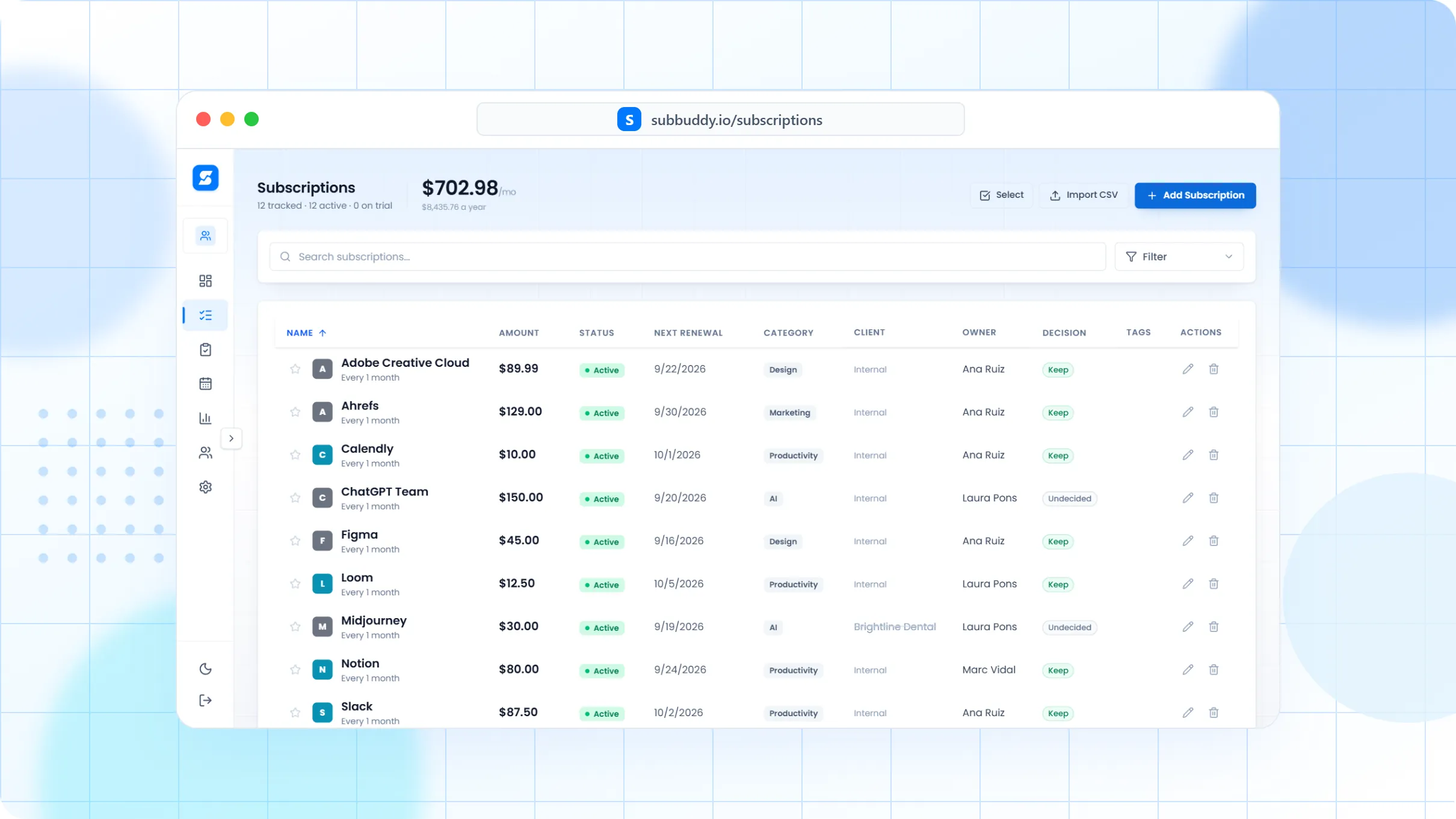
The example list after tagging:
| Tool | Client | Owner | Notes |
|---|---|---|---|
| Figma | Internal | Ana | Per seat: 5 paid, 4 used |
| Adobe Creative Cloud | Internal | Ana | Annual, renews in November |
| Webflow | Client X | Marc | Site launched in March; rebillable |
| Vercel | Client Z | Marc | Rebillable |
| Ahrefs | Internal | Alex | Monthly |
| Midjourney | Client Y | Laura | Client ended in June |
| ChatGPT Team | Internal | Laura | Per seat: 5 paid, 3 used |
| Slack, Notion, Loom | Internal | Ana | Monthly, per seat |
| Two Client Y stock-media plans | Client Y | Laura | Client ended in June |
The space overview now answers the question the spreadsheet never could: how much per month belongs to each client, to each owner, and to ended work. For the example agency, three subscriptions are tied to Client Y, which ended three months ago.
Step 4: Run the renewal review queue
The review queue lists everything renewing in the next 30, 60 and 90 days, undecided rows first. The team-only reasons that put a row in the queue are an undecided renewal inside the window and a client that ended; the personal reasons (a trial converting, a price increase, a stale row) apply too.
Each row takes one of five decisions, set inline or in bulk:
- Keep: renew as is.
- Review: not sure yet; the owner looks at usage before the date.
- Cancel: stop it before it renews.
- Downgrade: keep it on a smaller tier or fewer seats.
- Rebill: keep it and invoice the client for it.
In the example: Figma, downgrade from five seats to four. ChatGPT Team, downgrade to three seats. Webflow for Client X, review, because the site launched in March and hosting may move to the client. Vercel for Client Z, rebill. Ahrefs, Adobe, Slack, Notion, Loom, keep. Midjourney and the two stock-media plans under Client Y are dealt with in the next step.
Decisions are stored with the row. A renewal reminder goes to the tool's owner, not to the whole team, so Marc hears about Webflow and Laura hears about Midjourney, and nobody else gets a notification about a tool they do not use.
Step 5: A client ends
Client Y ended in June. Ana archives the client. Every subscription tagged with it, three in the example, drops into the review queue with the reason client ended. Nothing is cancelled automatically, because tools sometimes outlive a client: a font licence, a domain, a shared drive. Laura, who owns all three, decides them in one pass: Midjourney cancelled, one stock-media plan cancelled, the other kept and re-tagged as internal because the team uses it for pitches.
This is the flow that pays for the space. Without it, the three Client Y tools would have billed until someone noticed, which in the example agency was the spreadsheet's fault and in most real agencies is nobody's job.
Step 6: Export the quarterly audit
At the end of the quarter, Ana exports the audit CSV. It is the standard subscription export plus the team columns: client, owner, decision, rebillable and seats, with a second sheet of totals per client per period. The bookkeeper uses the rebillable rows for the client invoices and the per-client totals for the margin review. The export is also the record of who decided what, which is the part finance asks for.
What changed for the example agency
- Three tools tied to an ended client are cancelled or reassigned instead of billing for another quarter.
- Three unused seats across Figma and ChatGPT Team are dropped at the next renewal.
- Two rebillable tools are invoiced to clients instead of absorbed.
- Every remaining renewal has an owner and a decision, and the annual Adobe renewal has a reminder that reaches Ana in time to compare plans.
The numbers are illustrative, but the shape is the one we see: the savings come from ended clients and unused seats first, and from cancelling tools nobody uses second. The weekly review after this setup is a few minutes, because only undecided rows and new reasons appear.
Plans, caps and the trial
Every team space starts on a 14-day trial with no card, capped at 3 members and 75 subscriptions. When the trial ends, the space becomes read-only until a plan is chosen; nothing is deleted. Team Starter is $29 a month or $290 a year for up to 3 members and 75 subscriptions. Team is $79 a month or $790 a year for up to 10 members and unlimited subscriptions. Members do not need a paid personal plan, and there is no per-seat pricing. Details and the FAQ are on the agencies page.
If your agency's list is still a spreadsheet, the 21-column schema maps onto the CSV import, and the annual cost calculator turns per-seat monthly quotes into the yearly figure before you decide anything.
Table of Contents
Alex Coca
Alex Coca is the independent developer behind SubBuddy. He researches subscription billing, cancellation patterns, and recurring-spend workflows by building the product and reviewing real subscription audits from users and his own accounts.
Run the same review on your own tools
Every team space starts on a 14-day trial with no card. Import the tools you already pay for, tag them by client, and see what belongs to ended projects before the next renewal.
Start a team spaceRelated Articles

Per-Seat SaaS Billing, Decoded: How to Audit Seats and Actually Cancel a Team Plan
Team plans do not behave like personal subscriptions: one person is billed, leaving a workspace stops nothing, and a seat removed mid-cycle usually refunds nothing. Here is how per-seat billing works at Canva, Figma, GitHub Copilot and 1Password, and the seat audit that stops orphan seats renewing.

Small Business Software Subscription Audit Checklist: Cut SaaS Waste Without Breaking Your Workflow
A practical checklist for auditing every small business software subscription: owners, seats, usage, renewals, duplicates, security risk, and what to cancel, downgrade, or keep.

The 'Death by $5' Trap: Why Micro-SaaS is Draining Your Wallet
It's just $5, right? Wrong. Discover why small, seemingly insignificant app subscriptions are the most dangerous expenses in your budget and how to stop the bleeding.